

Wall Mounted Industrial All in One Machine
Company Profile
Relying on the advantages of independent production and processing, as well as the accumulated years of experience in the field of industrial control touch control equipment exploration,we have established a complete industrial control computer,industrial grade panel PC, fanless industrial control machine and other professional product lines, and have a number of product patents and software Copyrights.
In the future development, Kongxian technology will continue to adhere to the professional technology research and development ability and solution ability,to provide customers in various fields with better quality industrial control products, to help the development and take-off of customers.
Why choose us?
Professional team
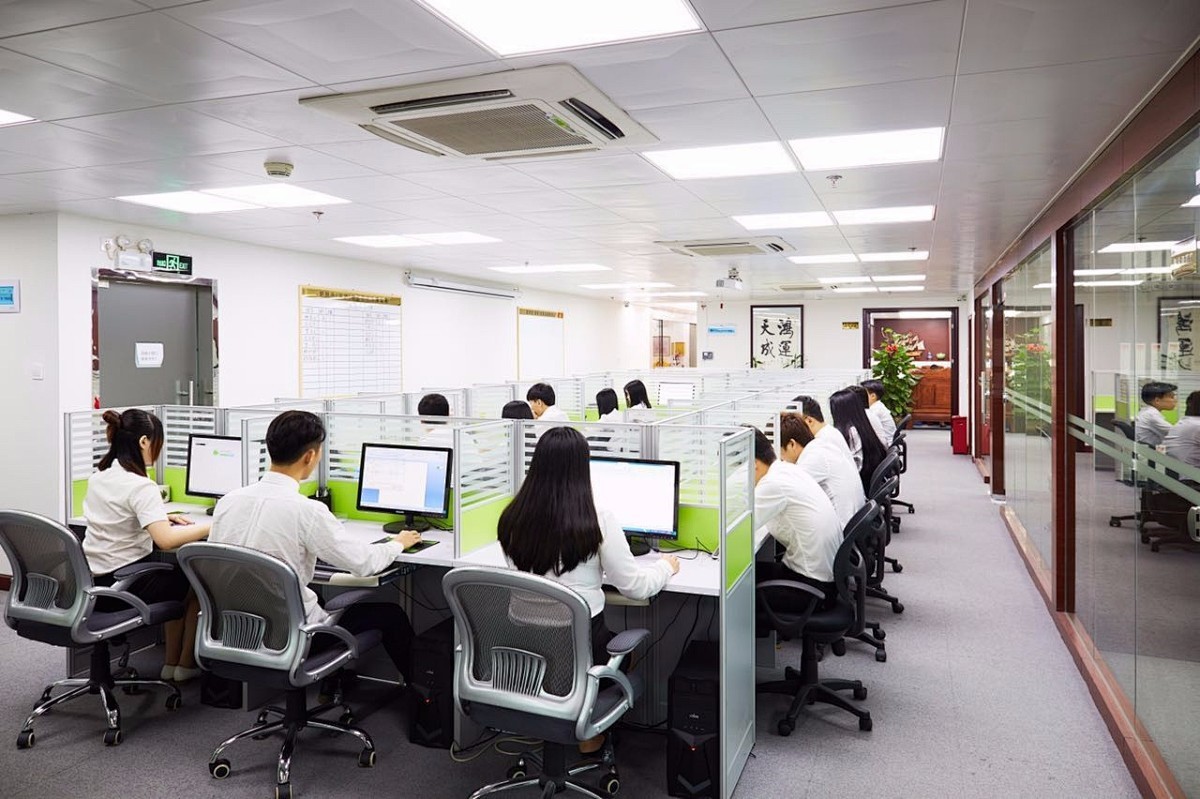
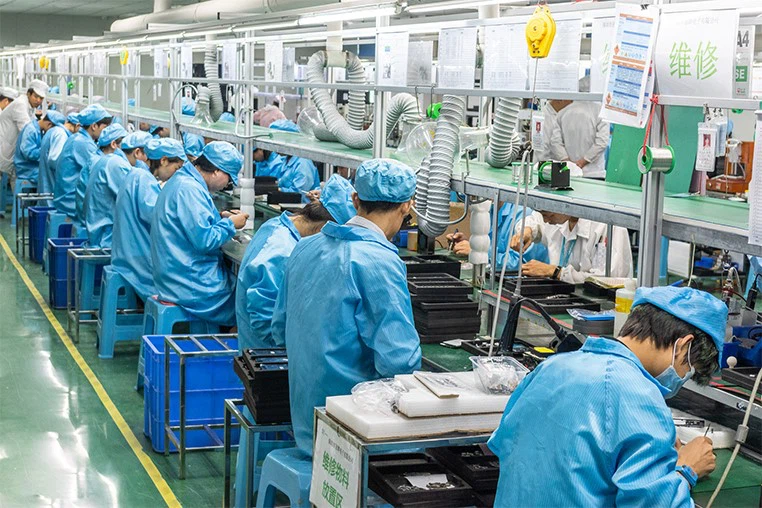
The company has more than 300 employees, professional and technical team more than 50 people, and has intelligent flow workshop, advanced testing instruments and other equipment.
Rich experience
Relying on the advantages of independent production and processing, as well as the accumulated years of experience in the field of industrial control touch control equipment exploration,we have established a complete industrial control computer,industrial grade panel PC, fanless industrial control machine and other professional product lines, and have a number of product patents and software Copyrights.
High quality
In the future development, Kongxian technology will continue to adhere to the professional technology research and development ability and solution ability,to provide customers in various fields with better quality industrial control products, to help the development and take-off of customers.
Product application
Our products are widely used in industries such as industrial automation, commercial intelligent terminals, CNC machine tools, instrumentation, rail transit, power, and security etc.
-
![Wall Mounted Industrial All in One Computer]() Wall Mounted Industrial All in One ComputerThe 13.3-inch wall-mounted industrial all-in-one computer, made of aluminum alloy, is IP65 dustproof and waterproof, with capacitive touch. The rear cover is equipped with standard VESA, and it is...read more
Wall Mounted Industrial All in One ComputerThe 13.3-inch wall-mounted industrial all-in-one computer, made of aluminum alloy, is IP65 dustproof and waterproof, with capacitive touch. The rear cover is equipped with standard VESA, and it is...read more -
![Capacitive Touch All in One Computer]() Capacitive Touch All in One Computer13.3-inch Industrial Android All-in-One Computer with highly sensitive touch screen and IP65 dustproof and waterproof rating. It offers multiple choices including A133/RK3288/RK3399 processors....read more
Capacitive Touch All in One Computer13.3-inch Industrial Android All-in-One Computer with highly sensitive touch screen and IP65 dustproof and waterproof rating. It offers multiple choices including A133/RK3288/RK3399 processors....read more -
![Tablet Pc Industrial]() Tablet Pc IndustrialFeaturing a pure flat design with sensitive touch response, it is crafted from sheet metal material and equipped with efficient heat dissipation vents on the rear cover for optimal cooling. It...read more
Tablet Pc IndustrialFeaturing a pure flat design with sensitive touch response, it is crafted from sheet metal material and equipped with efficient heat dissipation vents on the rear cover for optimal cooling. It...read more -
![Industrial android Panel PC]() Industrial android Panel PCThis industrial touchscreen boasts a sleek flat design with precise touch response. Crafted from durable sheet metal, it features efficient rear vents for optimal cooling. It supports wall-mount...read more
Industrial android Panel PCThis industrial touchscreen boasts a sleek flat design with precise touch response. Crafted from durable sheet metal, it features efficient rear vents for optimal cooling. It supports wall-mount...read more -
![Wall Mount All in One Panel PC]() Wall Mount All in One Panel PC32-65 inch optional, narrow edge frame design, supports wall mounted and arm mounted installation, sheet metal material, with heat dissipation holes, good heat dissipation effect, and high...read more
Wall Mount All in One Panel PC32-65 inch optional, narrow edge frame design, supports wall mounted and arm mounted installation, sheet metal material, with heat dissipation holes, good heat dissipation effect, and high...read more


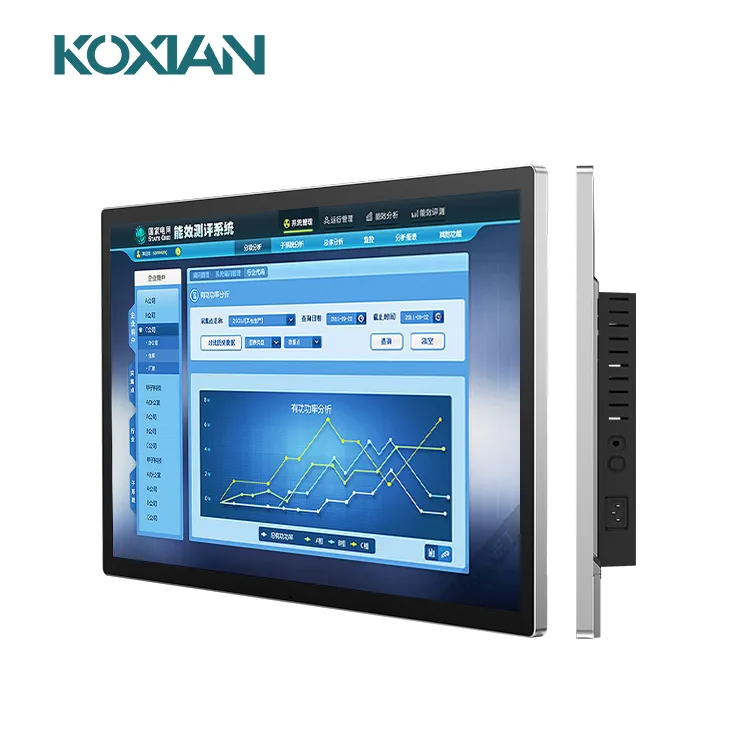
Wall Mounted Industrial All In One Machine Products Include: Capacitive Touch All in One Computer and Tablet Pc Industrial
What is Capacitive Touch All In One Computer
A capacitive touch screen is a type of input device used in computers and other electronic devices that allows users to interact with the graphical user interface by detecting the presence and location of touch inputs. It works based on the principles of capacitance, which is the ability of a material to hold an electrical charge. In a capacitive touch screen, a transparent layer of conductive material (usually Indium Tin Oxide or ITO) is coated onto the glass panel of the display. This layer forms a grid of electrodes. When a human finger comes into contact with the screen, it disrupts the electrostatic field on the surface due to the conductivity of the human body. The controller in the touch screen system can detect these minute changes in capacitance at each point on the grid and calculates the precise location where the touch event occurred.
Benefits of Capacitive Touch All In One Computer
Capacitive touch technology offers excellent screen sensitivity when used with a finger or stylus. The surface of these devices will respond to varying degrees of pressure, as opposed to a resistive touch screen where firm and direct pressure must be used. A TFT LCD capacitive touch screen is also sensitive enough to be used only with fingers without the need for a stylus.
TFT LCD capacitive displays are known for their excellent optical quality. The glass substrate that sits below the electrode film transmits most of the available light to the surface resulting in crisp sharpness and display contrast. These screens are also known for outstanding color fidelity that supports the viewing of high-quality images, video, and software content. This also has a positive impact on the user experience when integrated into larger kiosks and interactive displays.
Capacitive touch devices are very stable, with little to no shift in the image being transferred to the screen. This is an important advantage over other display types, as image shift can get worse over time and require manual correction with other types of displays. A capacitive touch device, therefore, does not require the periodic calibrations that are commonly necessary with many older display technologies. Maintaining a stable image is an essential requirement in high-performance display applications, such as those found in the broadcasting and entertainment industries.
The glass substrate of a capacitive touch display is very strong, and the protective layer helps prevent scratches and other marks. Like most displays, a capacitive touch screen can crack if dropped or exposed to significant pressure. It should be noted that a cracked resistive touch screen most often ceases to operate, while a cracked capacitive device will usually maintain some functionality. This has made capacitive screens popular for commercial applications that are exposed to significant wear and tear.
The screen of a capacitive touch device can be completely sealed, preventing contaminants from entering the seams on the outer edges of the display. Preventing dust and condensation from getting inside the display is important for long-term use. This also makes a capacitive touch display easy to clean. Due to the ease of cleaning and other advantages, capacitive touch technology is often used for public digital displays in high-traffic areas.
The sensitivity of a capacitive touch display also contributes to excellent response times. As a user touches the screen at different locations, the surface can register these movements with a high degree of accuracy. A capacitive touch screen also performs very well when the user’s finger or stylus is dragged across the surface. This makes capacitive touch a preferred choice for graphic design and audio-visual applications.
Types of Capacitive Touch All In One Computer
Capacitive touchscreens, with their use of capacitors, have revolutionized the way we interact with our devices. These touchscreens feature panels that are designed to detect the electrical charge from a finger when it comes into contact with the screen. This allows for a more intuitive and responsive user experience. The projected capacitive technology used in these screens has greatly improved the accuracy and sensitivity of touch input. This projected capacitive technology uses finger capacitance to detect when an object touches the surface of a touchscreen. The capacitive panels are equipped with capacitors that can sense touch. It relies on electrical current and a capacitor for sensing, specifically in surface capacitive touch, capacitance touch screens, capacitive touch panels, and projected capacitive. Capacitive touchscreens, equipped with capacitors, are widely used in consumer electronics like smartphones, tablets, and gaming consoles. These touchscreens offer unique features and benefits, such as the ability to detect the touch of a finger on the panels.
The most common type of capacitive touchscreens is the resistive one, which works by using two conductive layers separated by a thin gap filled with air or liquid-crystal material. These panels are designed to respond to the touch of a finger, with the projected capacitor technology. When pressure is applied onto the resistive film touch panels layer, it causes a change in resistance between these two layers resulting in an electronic signal being sent to the device’s processor allowing it to recognize what action was taken by the user. This process is different from surface capacitive or capacitive touch panels, which use touch sensors instead. This type of touchscreen, such as surface capacitive and projected capacitive panels, offers great accuracy when operated with a finger. However, it can be easily damaged if exposed to liquids or other substances that could corrode its sensitive components over time. The finger capacitance and sensing are crucial for the functionality of projected capacitive touchscreen panels.
Multi-touch capacitive touchscreens, featuring panels that can detect multiple points of contact with the finger, are a modern and popular technology for interactive applications like gaming and graphic design workflows. These projected capacitive touchscreens support multiple inputs from more than one finger or stylus pen simultaneously, allowing for precision input from multiple users at once. These panels are designed to enhance user experience and improve usability. Industrial grade projected capacitive touchscreens panels have also been developed specifically for use in harsh environments like factories, warehouses, and hospitals where finger durability is essential. Regularly cleaning your capacitive touch screen with a finger is important to ensure maximum performance levels and avoid potential damage caused by dirt build-up over time. Cleaning the touch screen panels is essential for maintaining its functionality.

Capacitive touchscreen panels must be touched with a finger, a special capacitive pen or a glove. That's because the panel is coated with a material that can store electrical charges. The change in capacitance signals the location of the touch. This differs from resistive and surface wave panels, which can sense input from a finger or stylus.
When a capacitive panel is touched, it draws a small charge to the point of contact, becoming a functional capacitor. The change in the electrostatic field is measured to find the location. In some designs, circuits located at each corner of the panel calculate the charge and send the information to the controller for processing. In multitouchscreens, sensors are arranged in a grid to enable more complex input.
An industrial computer is a computer for industrial workloads, such as automation, manufacturing (production of goods), and autonomous robotics. Industrial PCs are often preferred for industrial workloads because they tend to be made from industrial-grade components, which are more dependable and durable than their consumer counterparts and are pushed to extremes for mission-critical reliability. As such, industrial computer hardware tends to be somewhat more expensive than regular desktop PCs. However, the total cost of ownership proves to be a major return on investment in terms of reliability and performance.

Reliability and durability
In industrial settings, reliability and durability are paramount. Computers that are not purpose-built for industrial use can’t withstand the rigors of the environment and are likely to break down or fail soon after being deployed. This can lead to lost productivity, as well as increased downtime and repair costs.
Flexibility
Industrial tablets offer a high degree of flexibility, as they can be used in a variety of settings and for a variety of tasks. They can be deployed on the factory floor or in the warehouse, and can be used by managers, workers, and technicians alike.
Portability
Industrial tablets are highly portable, which is a major advantage in industrial settings where space is often limited. They can be easily carried from one workstation to another, or taken with you when you move between locations.
Ease of use
Industrial tablets are designed to be user-friendly, with large icons and menus that are easy to navigate. They often come with preloaded applications that can be used for a variety of tasks, such as inventory management or timekeeping.
Better asset tracking and inventory management
Many industrial tablet models have integrated barcode scanners or RFID readers, which can be used for asset tracking or inventory management. They also often have integrated industrial sensors, such as temperature, humidity, and pressure sensors.
Multiple ports and expansion slots
Because industrial tablets are designed for industrial use, they typically have multiple ports and expansion slots to accommodate industrial peripherals.
More-powerful processors
Industrial tablets typically have more powerful processors than ordinary computers, making them well-suited for tasks like data collection and analysis, image processing, and video streaming.
Cellular lte connectivity
Industrial tablets are often used in remote industrial settings where Wi-Fi is not available, so manufacturers are equipping their devices with cellular LTE connectivity.
Better security
As industrial tablets are being used for more critical applications, manufacturers are beefing up the security of their devices with features like hardware-based data encryption, fingerprint scanners, and device management capabilities.
Variety of form factors
Industrial tablets come in a variety of form factors to meet the needs of different industrial applications, including handheld, vehicle-mounted, and fixed.
Cost benefits
Industrial tablets offer a number of cost benefits over traditional industrial computers. They are typically more affordable, and have a lower total cost of ownership thanks to their longer lifespan and lower repair and maintenance costs.
Increased productivity
Industrial tablets can help increase productivity in industrial settings by reducing downtime, simplifying complex tasks, and enabling workers to access information and applications quickly and easily.
Better decision making:
With industrial tablets, managers have access to real-time data that can be used to make informed decisions about production, inventory, and other aspects of plant operations.
Improved worker safety
In industrial settings, worker safety is always a top priority. Industrial tablets can help improve worker safety by providing access to critical information and applications, and by enabling workers to stay connected with each other and with management.
Application of Tablet Pc Industrial

Industrial tablet computer applies to the medical industry
Industrial Tablet PC realizes automatic management of surgical operation, which can save a lot of management costs and time. With its portability and full-function, industrial tablet is a powerful tool of mobile medicine. It connects medical record, laboratory reports and various monitoring and treatment instruments to help medical staff to monitor the treatment conditions and new medical reports of each patient at any time.
• Medical cart equipment
• Diagnostic/therapeutic equipment
Industrial tablets applies to transportation industry
Transport depart personnel often need to query a large amount of information in real time, but it is difficult to deal with emergencies or large-scale business in time. In addition, transport business is more complex and multiple links and multiple locations of repeated work lead to the risk of omissions and errors. Mobile transportation solutions rely on industrial tablet PC terminals to extend the work system to frontline employees to achieve business processing information search and communication. To be specific, it can applies to the following items:
• Urban Light Rail ticket checking system.
• Maglev train power supply monitoring system.
• Highway toll collection system.
• Train vacuum stool collection monitoring system based on soft PLC.
• Container terminal cargo handling monitoring system.

Industrial tablet applies to service industry
Improvement of processing platform performance enable improvement the computing speed and graphics processing speed of industrial tablet computers. With the progress of industry, innovative applications are emerging to test the scalability of industrial tablet PCs. It is one of the important tools of future industrial tablet computers. When standard products can not meet the needs of users. Customization services have emerged in demand, saving the time and cost of user system configuration. To be specific, it can applies to the following items:
• Colleges and Universities: Campus card.
• Universities: University computer control and auto-control principle experimental system.
• Finance: Multimedia financial self-help terminal.
• Finance: Self-help bank access control management system.
• Petroleum: Automatic control of oil metering in petroleum industry.
• Agriculture: Agricultural greenhouse automation control.
• Food: Food assisted automation system.
Industrial computer applies to equipment and machinery manufacturing industry
• Precise control system for pressure and air tightness test.
• High voltage/light conversion system of X-ray machine.
• Automatic gauge control system of plate, strip and foil rolling mill.
• Maglev active vibration absorber.
• Elevator unmanned control system.
• Automatic control and management system of electronic aging line.
• Engine condition monitoring (noise/vibration).
• Distributed sintering machine monitoring system.
• Distributed hydraulic tool performance checking system.

How to Maintain Tablet Pc Industrial
Regular maintenance practices
Routine cleaning: Regularly clean the screen and exterior of the industrial tablet to prevent dust and debris from affecting its performance. Use a soft, lint-free cloth and avoid harsh chemicals that could damage the device.
Software updates: Keep the operating system and all applications up to date. Manufacturers often release updates that fix bugs, improve performance, and enhance security.
Battery care: Follow proper charging practices to prolong battery life. Avoid letting the battery drain completely and unplug the device once it’s fully charged. Periodically calibrate the battery if recommended by the manufacturer.
Environmental protection
Temperature control: Avoid exposing the industrial tablet to extreme temperatures, which can damage internal components. Store and use the device within the temperature range specified by the manufacturer.
Moisture and dust resistance: Ensure the industrial tablet is adequately protected against moisture and dust, especially in harsh agricultural environments. Use protective cases and covers designed for industrial use.
Shock and vibration protection: Industrial tablets should be ruggedized or equipped with shock-absorbing cases to protect against drops and vibrations commonly encountered in agricultural settings.
Preventive measures for common failures
Screen protection: Use screen protectors to prevent scratches and reduce the risk of screen damage. Ensure the tablet is stored and transported securely to avoid impact damage.
Port and connector care: Regularly inspect and clean ports and connectors to prevent dirt and debris buildup, which can cause connectivity issues. Use protective covers when ports are not in use.
Software health: Monitor the device for signs of software issues such as crashes or slow performance. Run diagnostic tools provided by the manufacturer to identify and resolve software problems early.
Effective troubleshooting and repair strategies
Diagnostic tools: Utilize built-in diagnostic tools or third-party applications to regularly check the health of the device. These tools can identify issues with hardware components, battery health, and system performance.
Repair services: Establish a relationship with certified repair services or the manufacturer’s service centers for prompt and reliable repairs. Use genuine parts for replacements to ensure compatibility and performance.
Backup and recovery: Regularly back up important data to prevent data loss in case of hardware failure. Use cloud storage solutions or external storage devices for secure backups.
Training and user education
User training: Provide training for users on best practices for handling and maintaining industrial tablets. Educate them on common signs of wear and how to address minor issues before they escalate.
Maintenance schedules: Implement a maintenance schedule that includes regular inspections, cleaning, and updates. Keep detailed records of maintenance activities to track the device’s condition over time.
Certifications

Our Factory
Focusing on industrial touch products and integrating R&D, manufacturing and sales.In the future development, Kongxian technology will continue to adhere to the professional technology research and development ability and solution ability,to provide customers in various fields with better quality industrial control products, to help the development and take-off of customers.


FAQ
As one of the most professional wall mounted industrial all in one machine manufacturers and suppliers in China, we're featured by quality products and good price. Please rest assured to buy bulk customized wall mounted industrial all in one machine from our factory.
industrial all in one wall mounted piece, wall mounted industrial machinery hoping, industrial wall mounted all in one segment