

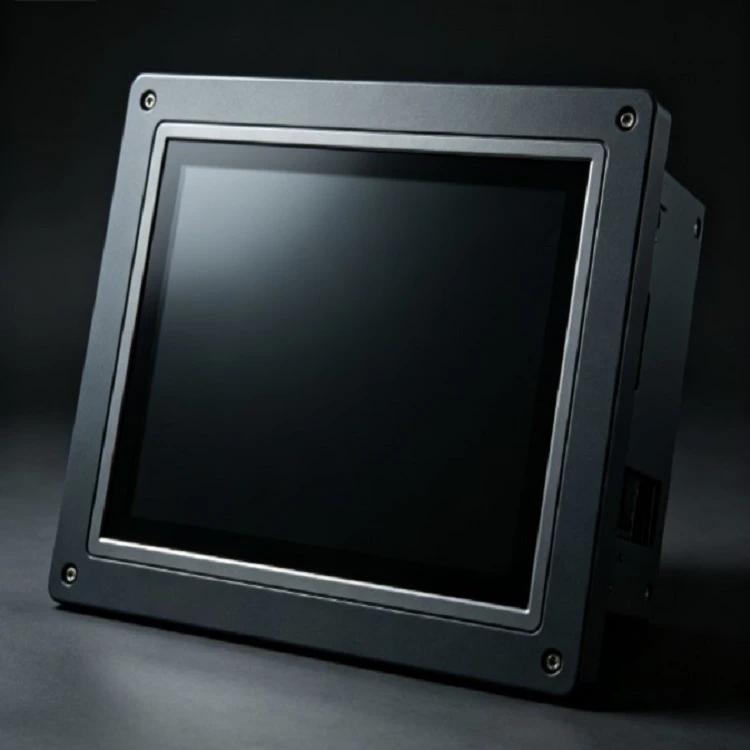
Product Overview
An IP65 Panel Mount Touch Monitor is engineered for integration directly into industrial machinery, control cabinets, operator consoles, and custom enclosures.
Unlike desktop monitors, this unit is installed through a precise panel cutout. The front bezel sits flush against the equipment surface, creating a sealed operator interface where the front-facing display is protected against dust and liquid ingress, while the rear housing remains protected inside the cabinet or machine body.
Technical Specifications Overview
|
Specification Category |
Configuration Options / Parameters |
|
Available Screen Sizes |
10.4 inch to 21.5 inch (Custom sizes available upon project review) |
|
Resolutions |
Standard and high-definition options |
|
Front Panel Protection |
IP65-rated front bezel (Dust-tight and protected against water jets) |
|
Touch Technologies |
Projected Capacitive (PCAP) or 5-Wire Resistive |
|
Display Brightness |
Standard industrial brightness (300 to 500 nits) or Sunlight Readable (1000+ nits) |
|
Video Interfaces |
HDMI, VGA, DisplayPort, DVI (depending on configuration) |
|
Touch Interfaces |
USB, RS232 |
|
Power Input |
12V / 24V DC industrial power input (Optional wide voltage input) |
|
Front Bezel Material |
Aluminum-magnesium alloy or heavy-duty cold-rolled steel |
|
Operating Temperature |
Standard industrial range (-10°C to 60°C) or wide temperature options |
Typical Industrial Applications
Machine Tool Enclosures: Integrated into CNC and milling machine operator panels for real-time monitoring and parameter input.
Control Cabinets: Flush-mounted onto electrical cabinet doors as the primary human-machine interface (HMI).
Factory Automation Systems: Deployed on assembly lines and robotic workcells to display production status and diagnostic alerts.
Self-Service and Kiosk Terminals: Embedded into custom enclosures for automated ticketing, industrial weighting, and logistics terminals.
Process Control Equipment: Utilized in chemical, pharmaceutical, and energy monitoring stations requiring rugged front-panel protection.
Engineering Considerations for Panel Integration
Integrating a panel mount monitor requires careful coordination between display dimensions and machine enclosure design.
Panel Cutout Accuracy: The cutout dimensions must match the monitor chassis tolerances to ensure proper compression of the front waterproof gasket.
Mounting Mechanisms: Secured via heavy-duty rear mounting clamps or screw-fastening brackets, preventing displacement under high-vibration industrial conditions.
Rear Clearance: Adequate internal depth must be reserved in the control cabinet or machine door for cable routing, connector clearance, and heat dissipation.
Cable Management: Right-angle connectors or specialized routing paths should be planned if the installation depth inside the enclosure is strictly limited.
Touch Technology Selection
Selecting the correct touch interface depends on operational requirements and the operating environment:
Projected Capacitive Touch (PCAP)
Characteristics: Supports multi-touch operations, flat glass front surface, high optical clarity, and responsive gesture control.
Typical Use: Modern HMI software, graphical control panels, automation systems, and clean-room equipment requiring frequent surface wiping.
5-Wire Resistive Touch
Characteristics: Operates under pressure-based input; responsive to bare fingers, gloved hands, stylus pens, or fingernails.
Typical Use: Heavy industrial workshops, outdoor control stations, and machine tools where operators wear protective work gloves.
Display Performance Selection
Display parameters must align with the software interface and ambient lighting conditions of the target environment:
Brightness and Readability: In semi-outdoor environments or high-ambient-light factory floors, high-brightness panels (1000 nits) maintain interface visibility and prevent washout.
Viewing Angles: Wide viewing angles ensure operators can read data clearly from lateral positions without color inversion.
Aspect Ratio: Standard 4:3 ratios match legacy industrial control systems, while widescreen 16:9 configurations suit modern Windows-based or web-based SCADA interfaces.
Customization Options for OEM Projects
Standard dimensions do not fit every machine design. Project-based customization services are available to meet specific mechanical or electronic requirements:
Mechanical Adjustments: Customized front bezel dimensions, custom panel cutout sizes, and tailored mounting hole patterns.
Chassis Materials: Specific surface treatments, custom paint colors (RAL color matching), or stainless steel front bezels for corrosive environments.
Optical Enhancements: Anti-glare (AG), anti-reflective (AR), or anti-fingerprint (AF) surface treatments.
Electrical Integration: Tailored power input specifications and dedicated cable harness lengths.
Quality Control & Manufacturing Process
To ensure batch-to-batch consistency for long-term industrial projects, manufacturing operations follow strict verification protocols:
Incoming Material Inspection: Rigorous screening of LCD panels, touch sensors, and controller boards.
Dust-Free Assembly: Touchscreen optical bonding and bezel assembly executed in controlled environments to prevent dust trapping.
Functional Testing: Extended burn-in tests, touch calibration checks, pixel verification, and interface signal stability tests.
Environmental Validation: Sample testing for temperature cycling, vibration resistance, and waterproof seal verification.
Logistics & Packaging Protection
Industrial displays require robust protection during international transit to prevent mechanical shock, bezel deformation, or LCD damage:
Custom EPE Foam Protection: High-density polyethylene foam custom-molded to match the exact contours of the monitor bezel.
Corrugated Outer Cartons: Double-walled heavy-duty export cartons designed to withstand stacking pressure.
Accessory Organization: Secure compartment design ensuring power adapters, brackets, and interface cables arrive intact without scratching the display surface.
FAQ
Q: Does the IP65 rating apply to the entire monitor housing?
A: No. In standard panel mount designs, the IP65 protection rating applies exclusively to the front-facing bezel and display surface when properly sealed against the cabinet or equipment panel using the provided gasket. The rear housing is designed for placement inside the protected interior of the machine or control enclosure.
Q: What is the difference between Projected Capacitive and Resistive touch for industrial use?
A: Projected Capacitive (PCAP) touch supports multi-touch functionality, offers a sleek glass front finish, and is ideal for modern graphical HMI software. Resistive touch relies on pressure actuation, allowing operation with bare fingers, thick industrial gloves, or stylus pens, making it better suited for heavy-duty workshops.
Q: Can the display brightness be upgraded for high-ambient-light environments?
A: Yes. While standard industrial brightness ranges from 300 to 500 nits, high-brightness options reaching 1000 nits or higher can be configured for semi-outdoor kiosks or brightly lit factory floors to prevent image wash-out.
Q: Are 2D and 3D CAD files available prior to placing an order?
A: Yes. Detailed mechanical drawings and 3D step models can be provided to assist machine builders and enclosure designers in verifying panel cutout dimensions, depth clearance, and mounting hole alignments before starting production.
Q: What video and touch interfaces are standard on these monitors?
A: Standard configurations include HDMI, VGA, and DisplayPort for video input, alongside USB or RS232 interfaces for touch data communication. Custom interface combinations can also be evaluated for specific project requirements.
Hot Tags: ip65 panel mount touch monitor, China ip65 panel mount touch monitor manufacturers, suppliers, factory


